MK SYSTEM / DOCUMENTATION
MovieKit Field Manager
MovieKit Field Manager lets you choose the film fields and taxonomies available on each public content type.
Location: WordPress admin → MovieKit → Field Manager. This screen assigns MovieKit taxonomies and meta fields to each public content type. Select the type in the left column before changing its controls. Administrator access is required.
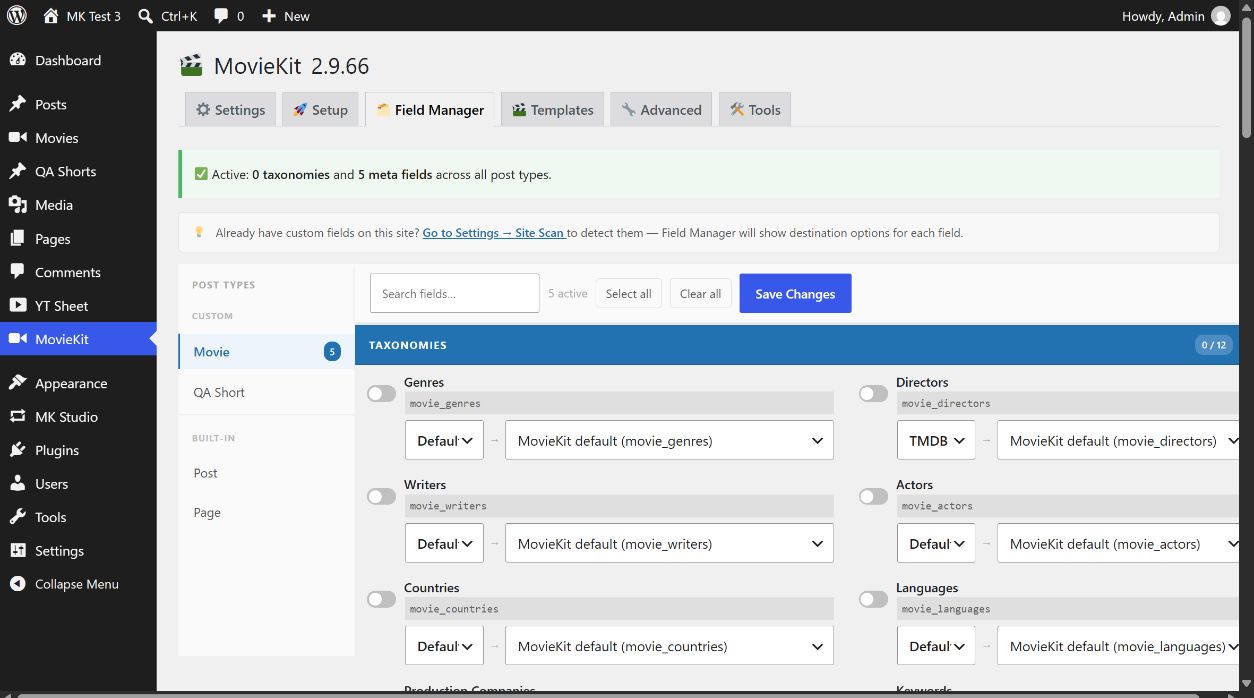
Assign fields to a content type
- Choose Movie, another registered type, Post or Page in Post Types. The count beside a type shows its active fields. Media attachments are not a Field Manager target.
- Use Search fields… to find a label or field key. Expand or collapse the Taxonomies and meta-field groups as needed. Search filters the view; it does not change saved assignments.
- Turn on the fields your editors need. Select all and Clear all affect only the selected post type. Review the switches, then select Save Changes. The active count and sidebar badge update after a successful save.
- Open an item of that content type and confirm that its chosen MovieKit controls appear. Existing values are not erased merely because a field is switched off; the switch changes its assignment to this type.
Field groups
| Group | Fields shown in the current version |
|---|---|
| Taxonomies (12) | Genres, Directors, Writers, Actors, Countries, Languages, Production Companies, Keywords, Type, Status, TV Networks, Years. |
| Basic Info (6) | Title, Original Title, Year, Release Date, Release Date ISO, Runtime. |
| Plot & Details (5) | Plot / Overview, Review, Tagline, Rated (MPAA), Awards. |
| Ratings & Stats (4) | Rating, IMDB Votes, Popularity Score, Vote Count. |
| Finance (3) | Budget $, Revenue $, Box Office. |
| IDs & Links (3) | IMDB ID, TMDB ID, Original Language Code. |
| Images (4) | Poster URL, Poster URL Original, Backdrop URL 1280, Backdrop URL Original. |
| Trailer & Teaser (6) | Trailer and teaser Watch URL, YouTube ID and Embed URL. |
| TV Series (4) | Number of Seasons, Number of Episodes, First Air Date, Last Air Date. |
Year and Years are related but different: Year is a meta field entered on the movie. The Years taxonomy can be enabled separately; MovieKit can derive its term from the saved Year value. Other taxonomies organize entries as terms, while meta fields hold individual values. See the field dictionary for every current field.
Data source and destination
When a field switch is off, the row exposes its Data source choice when an API can supply that value, plus a destination selector. These settings control a later MovieKit fetch; they do not fetch data when you select them. Default (recommended) appears on fields supported by both TMDb and OMDb: TMDb is normally primary, OMDb supplies missing values, and Genres can combine terms from both. TMDB only and OMDB only use one provider; Skip excludes that field from API filling. A manually written field such as Review has no API source selector. Available choices depend on the field.
MovieKit default writes to MovieKit’s normal field or taxonomy. A destination can instead point to shared WordPress Categories/Tags or existing site fields detected by Settings → Site Scan. Some meta rows offer + Add destination to write one fetched value to more than one chosen destination; × removes a destination line. Review custom mappings on a test item before applying them to established content. Select Save Changes for the selected post type to save assignments, source choices and mappings.
Removing a field safely
Switching a field off and saving removes its assignment from the selected post type; it does not delete the post’s stored values. The trash button on an active meta field is different: Hard delete permanently deletes that field’s saved values from every post of the selected type after a confirmation dialog. Make a database backup and verify the chosen field and post type before using it. The same button is not shown for taxonomy rows.
Continue with Create your first movie. API credentials are entered separately in MovieKit Settings.