MK SYSTEM / DOCUMENTATION
YT Sheet Profiles: Basic
YT Sheet profiles save the source, layout and player behavior used to display a reusable video grid.
Location: WordPress admin → YT Sheet → Add New Profile → Profile Settings → Basic. A Profile saves a source choice and the grid’s layout and behavior. After saving, the Shortcode box shows [yt-sheet profile="profile-slug"]; publish the Profile before placing it on a page.
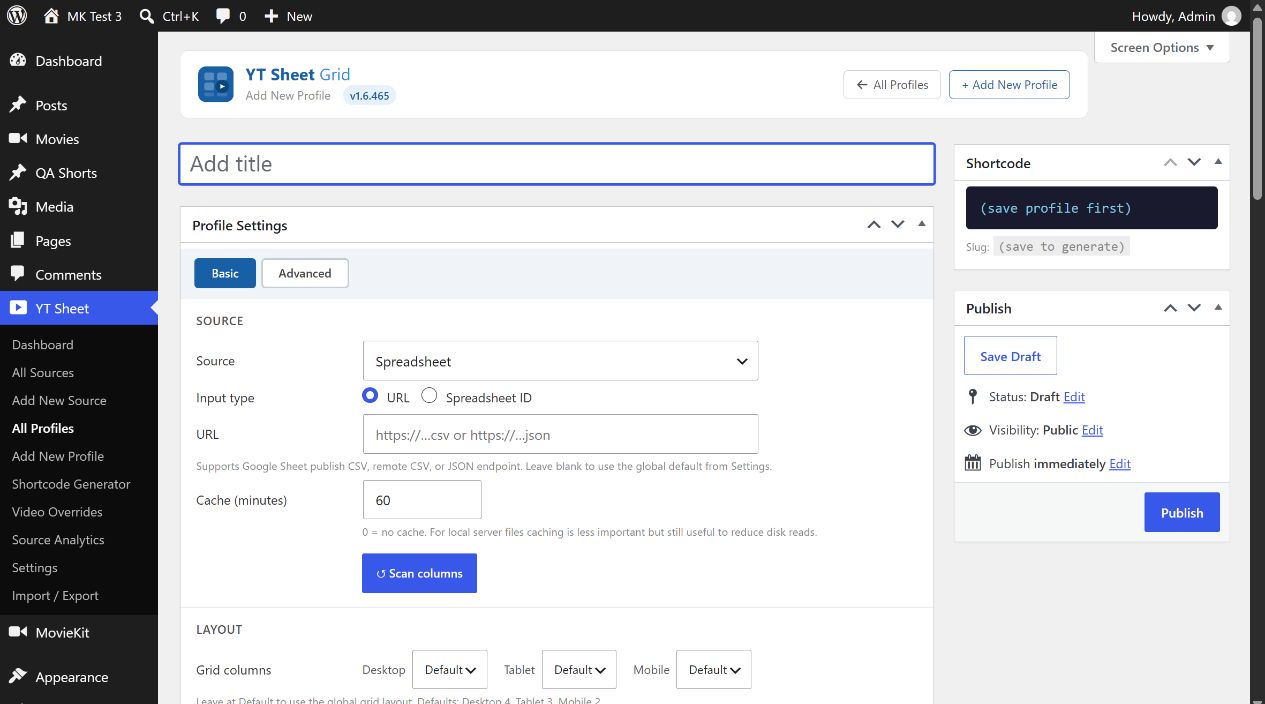
Source and columns
| Control | Choice and effect |
|---|---|
| Source → Spreadsheet | Choose URL (published Google Sheet CSV, remote CSV or JSON; blank uses the global Settings source) or Spreadsheet ID with tab name or GID. |
| Source → Your File | Use Upload / Select CSV to choose a Media Library CSV file. The selected file URL is saved in the Profile. |
| Source → My Source | Select a published Source from All Sources. The Profile uses its built dataset; a published but unbuilt Source has no dataset yet. |
| Cache (minutes) | Initial value 60; 0 disables the Profile’s feed cache. A My Source also has its separately built dataset. |
| Scan columns | Reads the selected source and fills column pickers used by player rows, sort, chips, filters and post links. Save the source choice first when required; inspect any scan error. |
Layout, player and pagination
| Control | Choice and effect |
|---|---|
| Grid columns | Desktop: Default or 2–6; Tablet: Default or 1–4; Mobile: Default or 1–2. The displayed defaults are 4 / 3 / 2. |
| Gap (px) | Desktop, Tablet and Mobile spacing, 0–40 px in each box. Initial values are 12 / 10 / 8. |
| Thumbnail ratio | Auto (no crop), 16:9, 4:3, 1:1 or 2:3. A fixed ratio makes cards the same shape. |
| Player mode | Inline, Lightbox or Off. Inline style offers Top, Row or Playlist when an inline player is used. |
| Max width (px) | Optional player width cap; 0 means no cap. |
| Player rows | Row 1 always shows the title. Add up to three further rows, with up to two scanned columns in each. The × button removes a row. |
| Pagination Mode | Global default, None (limit), Load more or Pagination. Per page / Step start at 48 / 24; Step applies to load more. |
Features and filters
| Control | Choice and effect |
|---|---|
| Deep linking | Enables ?v= parameters so a specific video can be shared. |
| Search; Search scope | Show a search bar. Search Visible items on the loaded page or the Whole feed (index). Whole-feed indexing embeds all items in page HTML and can enlarge a large page. |
| Sort; Default sort | Enable column sort controls. Choose no preset sort, Title A→Z, Title Z→A or another scanned field with ascending/descending direction. |
| Scroll to player | Use the global setting or choose Smart, Center or None for this Profile. |
| SEO schema | Output JSON-LD VideoObject data for the rendered videos. |
| Chips bar | Enable clickable chips above the grid and choose the scanned Field key that supplies their values. |
| Filters panel | Enable a left sidebar, set Panel title, Sidebar width (160–600 px; initial 320) and Breakpoint (320–2000 px; initial 768). |
| Filter rows | + Add filter maps a scanned Field key to a Label, filter Type, Multi selection and Search option. Scan columns first to populate the keys. |
| Video source filter | Auto-detects YouTube, Vimeo, Dailymotion, OK.ru and VK. Choose Checkboxes or Dropdown and customize its Label. |
| YouTube Channel tabs | When a My Source is a YouTube Channel, optional Show playlists tab and Show channel header controls appear. |
Sticky player and post link
Sticky player can float the player in a corner. Set Enable, Position (four corners), Width (initial 400 px), Height (0 for automatic 16:9), Min screen (initial 768 px) and Margin (initial 16 px) for this Profile.
Post link / Read on site shows a link when a permalink column exists. Turn on Enable, choose the scanned Permalink field, set its Label (initially “Read on site”) and choose Under thumbnail, Under player or Both. Run Scan columns first if the field picker is empty.
The Basic and Advanced tabs save separately; saving one tab does not clear fields from the other. Check the published page after changing a Profile. External video playback and the full responsive layout still need verification with the final data source.