MK SYSTEM / DOCUMENTATION
Install MK
Follow these steps to install MK Theme and choose the companion plugins your movie site needs.
Install the theme first, then choose the included plugins in MK Setup. MK Studio and MovieKit support the full movie workflow. YT Sheet Grid is included and optional to install.
Prepare the ZIPs
The main MK Theme download is a container with several ZIP files. Extract the main package on your computer. Locate the installable mk-theme.zip. Keep the companion plugin ZIPs available in case you need the manual installation path.
Install the theme
- In WordPress, open Appearance → Themes → Add New → Upload Theme.
- Select
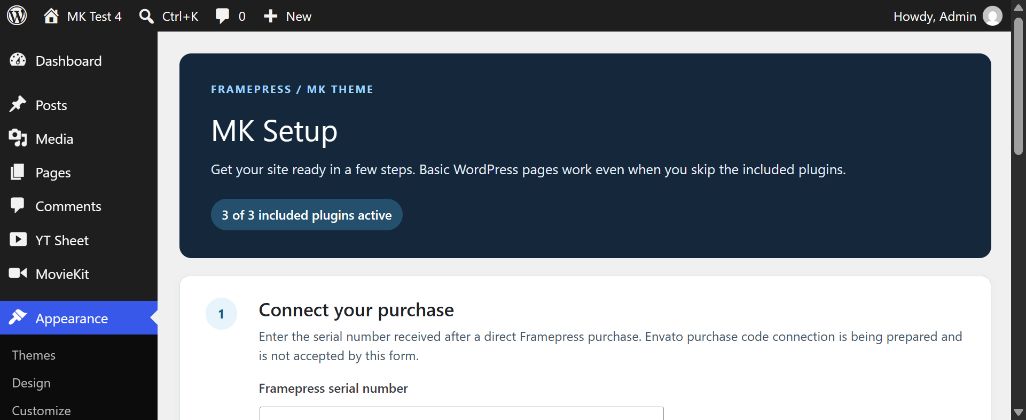
mk-theme.zip, choose Install Now, then Activate. - Open Appearance → MK Setup. On a first activation, WordPress may direct you to this screen automatically.
MK Theme can display ordinary WordPress posts and pages without the companion plugins. Check your front page and a regular page before continuing.
Connect the purchase
If you bought directly from Framepress, use the serial number in the first MK Setup step. Read Activate your purchase for the consent and move rules. The current form does not accept Envato purchase codes.
Choose the included plugins
- In MK Setup, review each plugin’s Active, Installed, inactive, Ready to install or Package unavailable status.
- Select Choose and install plugins. The WordPress plugin screen lets you choose and confirm the packages to install and activate.
- For a movie site, select MK Studio and MovieKit. Select YT Sheet Grid when you want managed video sources and grids.
- Return to MK Setup and verify that your selected plugins show Active. Use the links in Start building to open their admin screens.
If the bundled installer reports Package unavailable, use Plugins → Add New → Upload Plugin with the corresponding ZIP from your main package. If a plugin is already installed, compare versions before replacing it. Back up an established site before updating.
Check the result
Open MovieKit → Setup and MK Studio to confirm their menus load. The next guide, Create your first movie, starts with a dedicated MovieKit post type.
Choose your starting configuration
After activating MK Studio, return to MK Setup and select Start quick setup. The Quick Setup guide covers site identity, appearance, header, homepage, movie defaults and optional API services. Nothing is applied until you review and confirm the changes.