MK SYSTEM / DOCUMENTATION
MK Studio Pages and Posts
MK Studio Pages and Posts settings shape regular WordPress content, including single pages, archives, comments and widget areas.
Location: WordPress admin → MK Studio → Pages & Posts. The subtabs are Single Post, Single Page, Blog / Archives, Comments, Widget Areas and 404. Each has its own Save Changes or widget-area save control. These settings apply to regular WordPress content. Movie posts have separate controls under MK Studio → Movies. Visibility of titles, metadata, featured images and comments is set under Display.
Single Post and Single Page
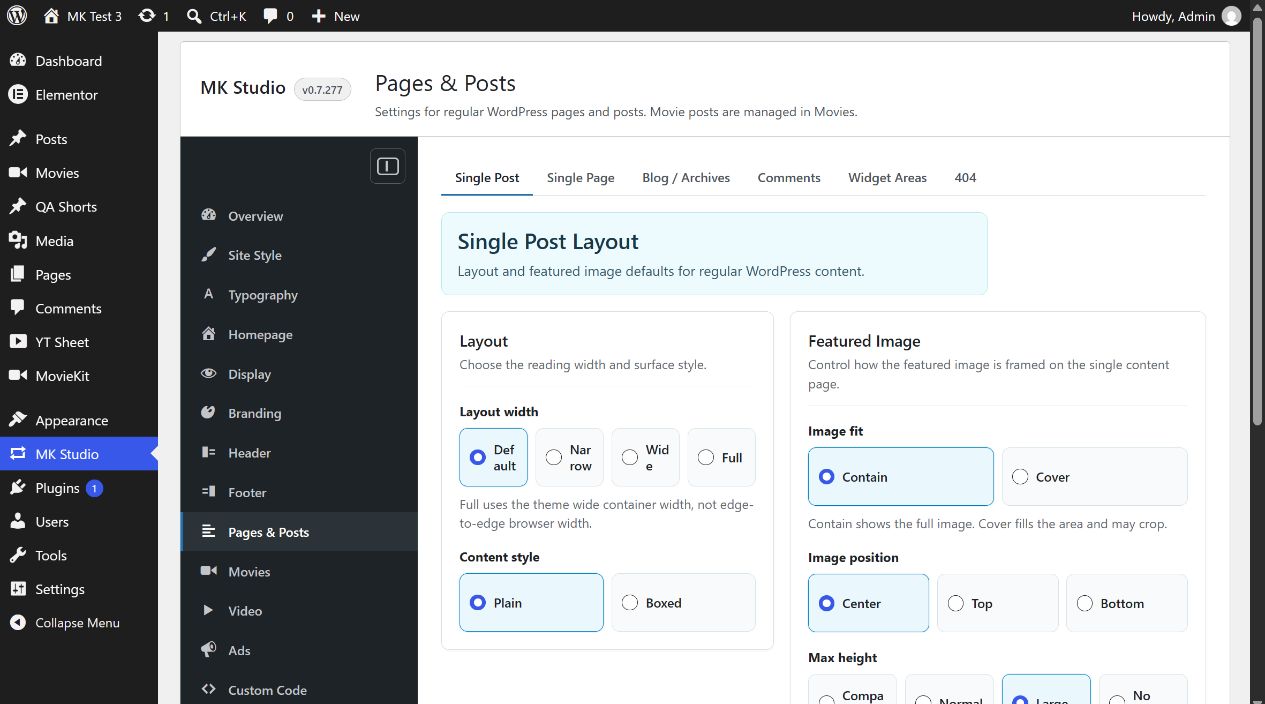
Both subtabs have the same independent controls. Editing Single Post does not change Single Page. Choose values and click Save Changes on that subtab.
| Control | Values; initial value | Effect |
|---|---|---|
| Layout width | Default, Narrow, Wide, Full; Default | Reading container width. Full uses the theme’s wide container, not the browser edge. |
| Content style | Plain, Boxed; Plain | Reading surface around the content. |
| Featured Image → Image fit | Contain, Cover; Contain | Contain preserves the whole image; Cover fills the area and may crop. |
| Image position | Center, Top, Bottom; Center | Focus when an image is framed or cropped. |
| Max height | Compact, Normal, Large, No limit; Large | Maximum framed image height. |
| Image radius | Inherit, None, Small, Medium, Large; Inherit | Corner treatment; Inherit follows the theme. |
For example, set a long article’s Single Post width to Narrow and content style to Plain, then inspect its public post page. For a full-width landing page, edit Single Page instead. These controls affect an image only if the content has a featured image and Display permits it.
Other subtabs
- Blog / Archives covers the layout, cards, query, pagination and spacing of regular WordPress post archives.
- Comments and 404 covers comment presentation and the missing-page template.
- Widget Areas covers protected and custom areas, shortcodes, placements and the local Wizard.
Content width overrides
Single Post and Single Page set the global reading-width choice for ordinary content. Each item’s MK Layout Options can inherit it or use Default (800px), Narrow (680px), Wide (1000px) or Full (site container width). Full follows Site Style’s outer width and mobile spacing. Elementor controls its own layouts.
Writing ordinary Posts with Article AI
The settings in this section govern presentation. To revise a Post’s title, excerpt or supported body text, open Article AI in the Post editor. Configure its dedicated writing/excerpt/SEO rules in AI Tools → Fine Tuning → Articles. Movie writing rules and frontend Movie AI Help are separate.