MK SYSTEM / DOCUMENTATION
MK Studio Homepage
MK Studio Homepage controls how your front page is rendered and which content sections appear on it.
Location: WordPress admin → MK Studio → Homepage. Use this screen to choose how the front page is rendered and arrange its sections. Movie sections require MovieKit and published movie entries. For the Movies section’s query and card controls, see Movies section reference.
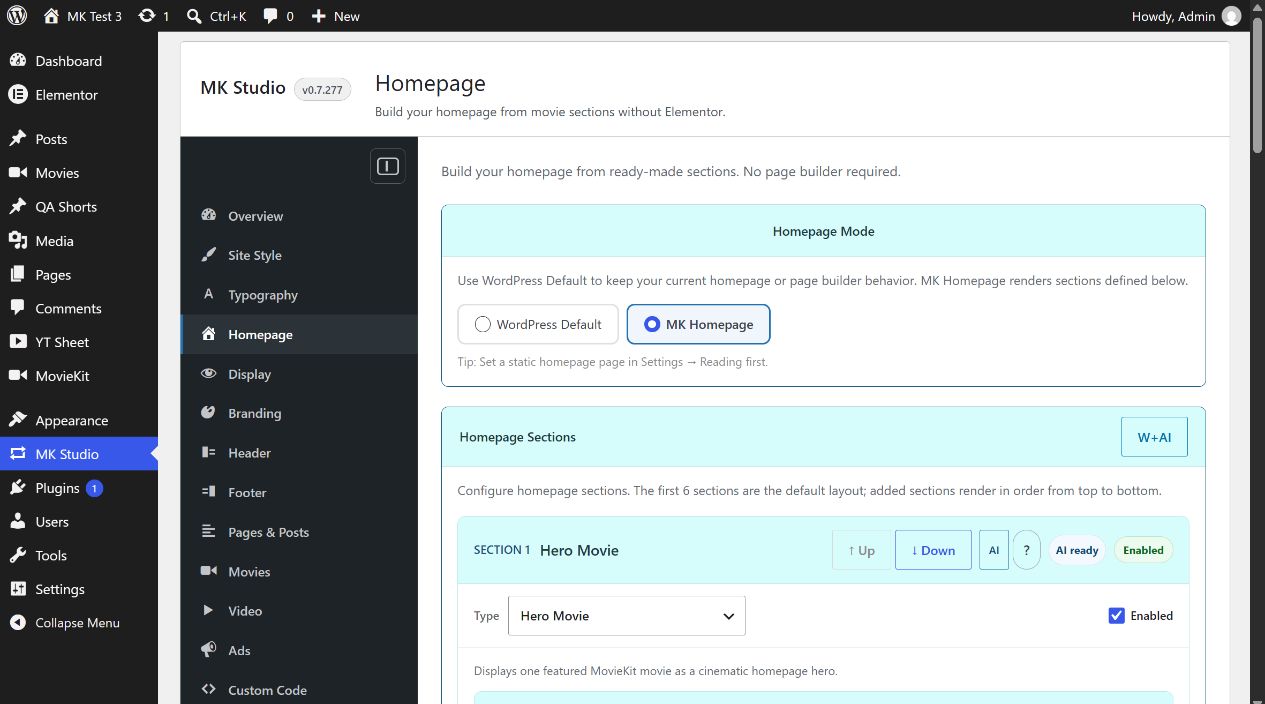
Homepage Mode
WordPress Default is the initial mode and leaves the current WordPress homepage or page builder in charge. MK Homepage renders the enabled sections below through MK Theme. Choose the mode and click Save Homepage Settings. Set a static front page in Settings → Reading first, as the admin screen recommends. Selecting a mode alone does not save it.
Managing sections
Six slots are created initially: Hero Movie, Movie Search / Filter, Movies, Blog Posts, Shortcode and Disabled. Your saved site can have a different order and types. Each slot has a Type selector and an Enabled checkbox. A disabled slot or a slot with Type Disabled does not render. ↑ Up and ↓ Down change the order; the front page follows the list from top to bottom. + Add Section appends a disabled slot. Added slots can be deleted; the original six remain in the form. These buttons submit the form and save the current values, so review edits to other slots before using them.
When you change a slot’s Type, controls for most new types appear after Save Homepage Settings and reload. Video First shows its initial controls immediately. Enter settings for the new type, enable the slot, then save again. The AI buttons beside the sections and Open Homepage Wizard plus AI belong to MK Studio’s AI Tools; they are optional and their ready/skipped badges are status indicators.
Section types and controls
| Type | Controls and defaults | Result and checks |
|---|---|---|
| Hero Movie | Movie → Source: Latest movie (default) or Select manually. Movie ID: numeric WordPress movie post ID, used only for manual source. Display: Backdrop image, Poster, Genres label, Title, Tagline, Meta row, Plot / overview and Action buttons; all on initially. | One featured MovieKit movie. For a specific film, select manually and enter its published movie ID, then save. Hiding too many Hero elements can leave an empty area; inspect the front page after saving. |
| Hero Slider | Movies → Movie IDs: comma-separated published MovieKit post IDs, at most five retained, in the entered order. Slider: Show dots, Show arrows, Autoplay and Pause on hover/focus are on initially; Autoplay delay starts at 5000 ms and is limited to 2000–15000 ms. Display: the same eight Hero element toggles as Hero Movie, applied to every slide. | A cinematic slider. Enter, for example, 6,12,18. Use real published IDs; a missing or unpublished movie cannot supply a slide. Check navigation, timing, focus and small screens. |
| Video First | Movie → Source: Latest movie or Manual movie ID. Movie ID is used for manual source. Video → Video mode: Inherit (default), Inline, Lightbox or External. | One movie with a video-led Hero. Inherit uses the movie template’s opening behavior; other modes override this section only. The movie needs a usable video source for a video to open. |
| Movie Search / Filter | Show keyword search and Show year filter are on initially. Taxonomy filters are currently fixed to genres and countries; the screen does not offer an editor for that list. | A movie search form. Disabling both visible toggles still leaves the taxonomy filters. Test with published movies that have genre, country and year data. |
| Movies | Basic, Query Source, Additional Filters, Badges & Genres, Card Design. | A configurable MovieKit movie collection. See the complete Movies section reference. |
| Blog Posts | Title: From the Blog. Count: 3, allowed 1–12. Columns: 3, choices 2/3/4. Category: All categories or one WordPress post category. Title position: Below image, Over image or None. Show title, Show excerpt, Show read more are on initially. | Regular WordPress posts, not MovieKit movies. Choose a category only when you want to narrow the posts. Verify the cards on the front page after saving. |
| Shortcode | Title is empty initially, Show title is on, and Shortcode accepts shortcode text such as a YT Sheet Grid shortcode. The section is initially disabled. | Runs the entered shortcode inside a homepage section. Enable it after entering a valid shortcode; an empty value produces no useful content. Check the output and plugin dependency on the front page. |
| Disabled | No type-specific settings. | Does not render, even if the slot’s Enabled checkbox is on. |
Example: feature one movie
- Publish a MovieKit movie and note its numeric post ID from the edit URL.
- In a Hero Movie slot, choose Select manually, enter the ID, and leave Enabled on.
- Choose MK Homepage, save, and open the site’s front page. Check the movie title, image and action links. If the Hero is blank, confirm the movie is published and the ID is correct.
Collapsible section panels
Each slot is a collapsible Section panel. Open the slot you are editing and close the others to keep the screen manageable. Its name/type identifies the section. Save Homepage Settings after changing its options.
MK Search
MK Search is an additional section type for a single search field covering Movies, ordinary WordPress Posts or both. Configure its text, button and optional All / Movies / Articles choices. Enter or the search button opens the standard results page. This differs from Movie Search / Filter, which browses the movie catalog. Shared labels are configured in Widgets → Search labels; this section is configured manually in the current version.
Movies carousel
A Movies slot can use Carousel (posters) instead of its grid/list layouts. Set visible posters for desktop, tablet and mobile, and optionally show carousel arrows. The movie query and card options still supply the collection. This is separate from the large Hero Slider.
Widget shortcodes in a page or section
Use Widgets to generate reusable movie, Journal, Video Grid, Explore or Search sections. Paste the shortcode into a Homepage Shortcode slot or a normal WordPress page. A normal page assembled with shortcodes is edited in WordPress; it is not a separate saved MK Homepage configuration. Video Grid uses existing movie videos and does not require YT Sheet.