MK SYSTEM / DOCUMENTATION
MovieKit Setup and content types
MovieKit setup lets you register movie and TV content types before choosing their fields and taxonomies.
Location: WordPress admin → MovieKit → Setup. Register a content type such as Movies or TV Shows here. Then choose its movie fields in Field Manager. Administrator access is required.
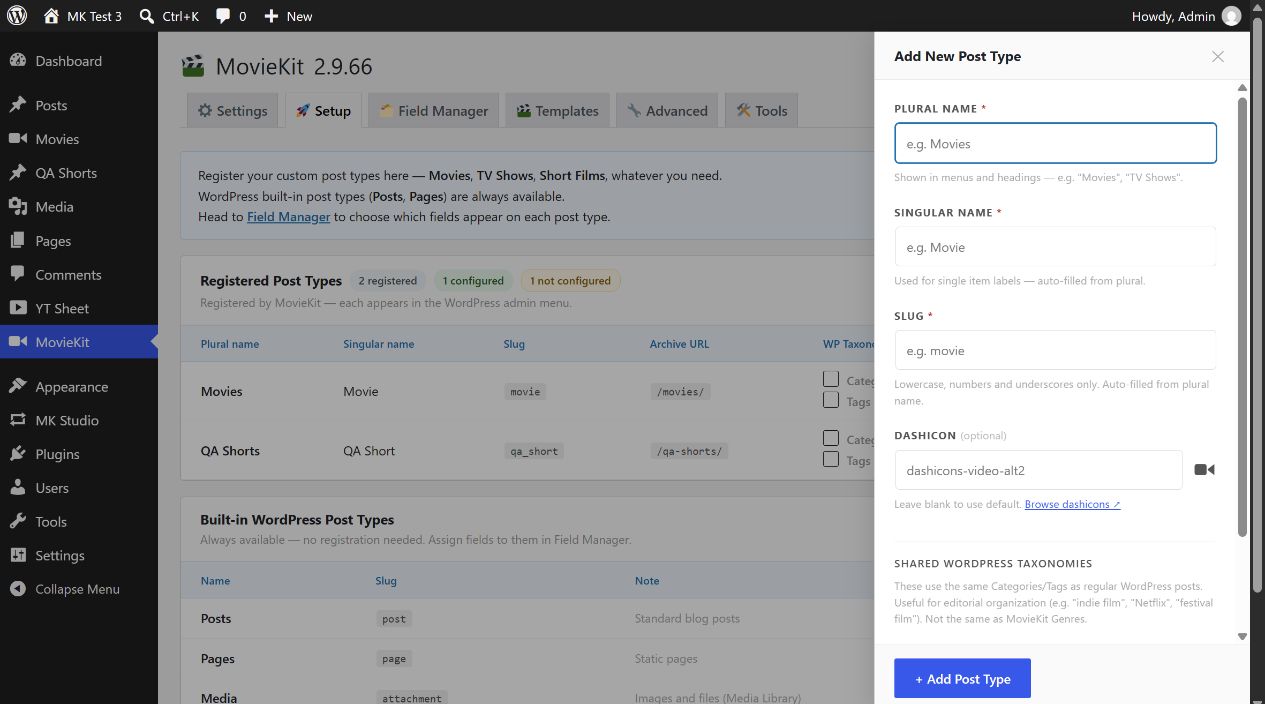
Register a movie type
- Select + Add New Post Type. Enter Plural name (for example, Movies). MovieKit suggests Singular name and Slug; review and change both if needed.
- Use a unique slug with lowercase letters, numbers or underscores, such as
movie. The plural, singular and slug fields are required. A reserved WordPress slug or a duplicate MovieKit slug is rejected. - Optionally enter a WordPress Dashicon name. A blank value uses the standard post icon. Optionally enable shared WordPress Categories or Tags if this content type should use the same editorial terms as regular posts. These are separate from MovieKit Genres and its other movie taxonomies.
- Select + Add Post Type. After the page reloads, check Registered Post Types and the new WordPress admin menu. The table shows the singular and plural names, internal slug and archive URL. The archive path is derived from the plural name; for Movies it is
/movies/. - Open Field Manager, select the new type and enable the fields it needs. A registered type without assigned fields is shown as not configured.
Controls and effects
| Control | Effect |
|---|---|
| Plural name / Singular name | Used in admin menus, headings and singular item labels. Singular is suggested while typing the plural name and can be edited. |
| Slug | Internal post type identifier and single-item URL base. Suggested from the plural name; review before adding content because the Setup table has no rename control. |
| Dashicon | Icon for the WordPress admin menu. Blank uses the standard post icon. |
| Enable shared WordPress Categories / Tags | Adds the regular WordPress taxonomies to the new type. Both are off initially; they can also be toggled later in the Registered Post Types table. |
| Category ON/OFF; Tags ON/OFF | Saves the corresponding shared taxonomy choice immediately for that registered type. |
| Remove post type | Unregisters the type from WordPress after confirmation. Existing posts of that type remain in the database but are no longer available through the normal menu until the type is registered again. Make a backup before changing a type that already has content. |
| Registered / configured counts | Read-only status. Configured means at least one MovieKit meta field or taxonomy is assigned to the type. |
| Built-in WordPress Post Types | Posts and Pages are always available for field assignment in Field Manager. Media is listed for context; it is not offered as a Field Manager target. |
For a full MK Theme movie page, begin with a dedicated MovieKit type such as movie. Assigning movie fields to an ordinary Post does not by itself select a Theme movie template. Follow Create your first movie for that complete path.