MK SYSTEM / DOCUMENTATION
YT Sheet WP Source
A YT Sheet WP Source turns published WordPress posts with video fields into a reusable video dataset.
Location: WordPress admin → YT Sheet → Add New Source → Source type → WP Source. This type turns published WordPress posts into a video dataset. Use it when each film or post already has a video URL in a custom field.
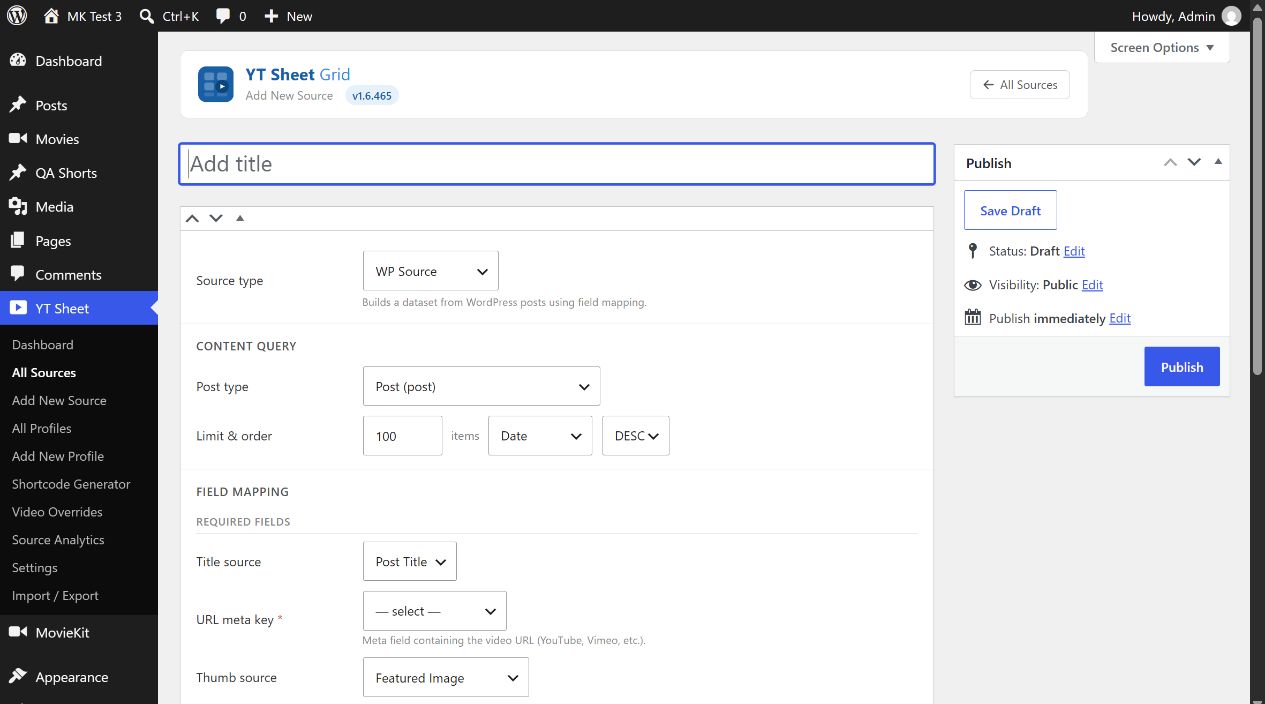
Content query
| Control | Choice and effect |
|---|---|
| Post type | Select a public content type such as Posts, Pages or Movies. Only published items enter the dataset. |
| Limit | Initial value 100, allowed range 1–2000. Caps the posts considered in the build. |
| Order by; ASC/DESC | Date (initial value), Modified, Title, Menu order or Random, with descending or ascending order. This controls the query that supplies the cached dataset. |
Field mapping
- Choose Title source: Post Title (initial value), or a Meta field and its key.
- Select the required URL meta key that holds the video URL. A missing key stops the build; a selected key with an empty value on a particular post yields no playable URL for that item.
- Choose Thumb source: Featured Image (initial value) or Meta field (image URL), then select that meta key. The builder falls back to the post’s featured image if the chosen image URL is empty.
- Use + Add field for each extra dataset column. Enter its output Key and select a Meta field, Post field or Taxonomy. Post fields include date, modified date, slug, author, permalink and excerpt. Remove a row with its × button. Save and rebuild to make added columns available to grid filters, rows and sorting.
For meta key selectors, choose an existing key or Custom key… if it is not listed. The key must match the WordPress data stored on the selected post type.
Content filters
Each taxonomy attached to the chosen post type may use Ignore (initial value), Include selected or Exclude selected. Choose terms, use All or None to adjust them, or Clear all filters to reset the section. Active taxonomies are combined with AND logic: a post must satisfy every active filter. The term search appears when a taxonomy has more than ten terms.
Build and maintain
Publish the Source, then select Build now. The cache shows built time, item count and size. If content or mapping changes, an Outdated badge can appear. Select Update for changed form fields before Rebuild; the build reads saved values. Clear cache removes the dataset. Force recheck unavailable, when shown, clears cached unavailable YouTube statuses so the next rebuild can check them again.
Auto rebuild offers Manual (initial value), Hourly, Twice daily and Daily. The automatic choices schedule dirty dataset rebuilds through WordPress cron; they depend on cron running on the site. A provider key is not required to build non-YouTube URLs; supported YouTube status checks run only when the YouTube API feature and key are configured.