MK SYSTEM / DOCUMENTATION
Build a movie homepage
Create a movie homepage with a featured film and a grid of published MovieKit entries.
Build a film homepage with one Hero Movie section and one Movies grid. Publish at least one MovieKit movie first; an empty movie query cannot show a movie card.
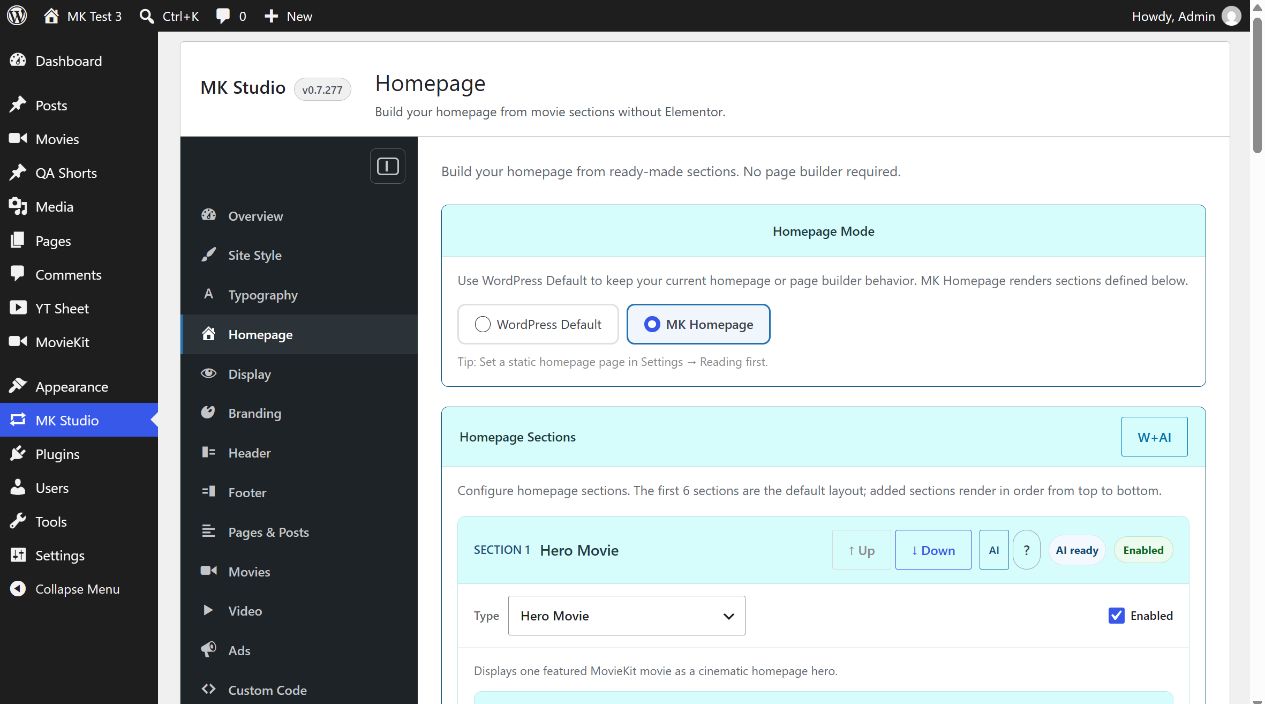
Choose the homepage mode
- In WordPress, open Settings → Reading and choose the page you want as the static homepage if you use one.
- Open MK Studio → Homepage. Under Homepage Mode, select MK Homepage. WordPress Default keeps the existing page or page-builder behavior instead.
Add the movie sections
- Under Homepage Sections, set one enabled section to Hero Movie. In its Movie controls, choose Latest movie or Select manually and enter the movie’s post ID.
- Set another enabled section to Movies. Start with a simple recent-movies selection and give the section a clear title.
- Use the ↑ Up and ↓ Down buttons if you need to change their order. Select Save Homepage Settings.
- Open the site’s front page and check both the hero and movie grid on desktop and mobile.
If the Movies selection returns no published movies, that section is omitted while other enabled sections remain. Check your movie’s published status, post type and section filters if the grid is empty. Switching back to WordPress Default restores the normal WordPress homepage behavior.