MK SYSTEM / DOCUMENTATION
Getting started
This MK Theme setup guide takes you from installing the package to creating your first movie page.
Build your first movie site with MK Theme, MK Studio and MovieKit. Your MK Theme purchase also includes YT Sheet Grid, which you can install when you need managed video sources and grids.
What is in the package?
- MK Theme displays your WordPress site and movie pages. It can show basic WordPress content without the companion plugins.
- MK Studio controls the site style, homepage, movie presentation and related settings. Use it for the full MK site workflow.
- MovieKit adds movie content, structured fields and film data tools. Use it for the movie workflow.
- YT Sheet Grid adds managed video sources, profiles and grids. It is included, but installation is optional.
Before you start
Check the requirements and compatibility guide for the package versions we have verified together.
- Have a working WordPress site and an administrator account.
- Have the MK Theme main package from your purchase. Keep the original ZIP: it includes the companion plugin packages.
- Have your Framepress serial number if you bought directly from Framepress. A ThemeForest purchase uses an Envato purchase code; the current MK Setup does not yet accept that code.
- Back up an established site before replacing its theme or plugins.
You can begin without AI or film-data API credentials. Add credentials only for the external services you decide to use.
1. Install and activate MK Theme
- In WordPress, open Appearance → Themes → Add New → Upload Theme.
- Choose the installable MK Theme ZIP from your package, then select Install Now and Activate. If your download is a main package containing several ZIPs, extract it first and select the theme ZIP inside.
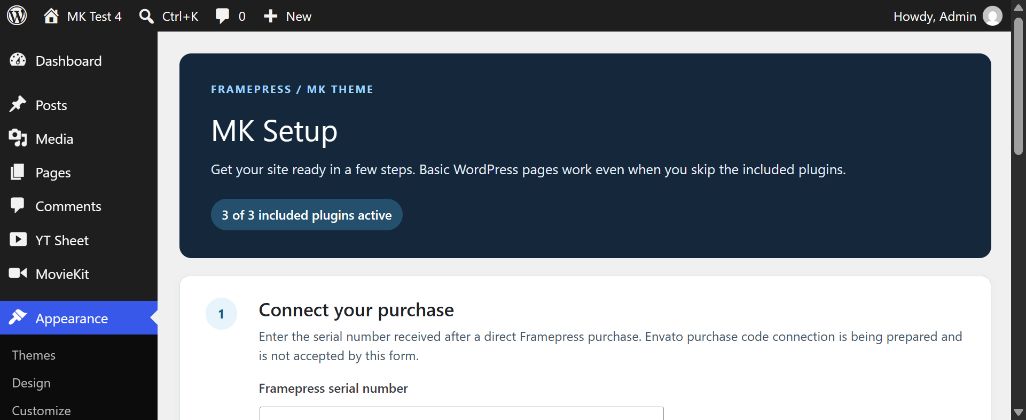
- Open Appearance → MK Setup. The setup screen shows the purchase connection, the three included plugins and links to the tools you activate.
2. Connect a direct Framepress purchase
If you bought on Framepress, enter your serial number in MK Setup → Connect your purchase, confirm the data transfer and select Verify and connect. The theme sends the serial number, this site’s URL and a random installation ID to the Framepress service. A successful connection shows “Framepress connected” and the final four characters of the number.
ThemeForest buyers: the current MK Setup does not accept Envato purchase codes yet. You can continue with the plugin packages included in the main theme download. Envato connection instructions will be added when that integration is available.
If the Framepress service cannot be reached, try again later. A connection error does not prevent the theme from displaying basic WordPress pages.
3. Choose the included plugins
- In Appearance → MK Setup, review the status of MK Studio, MovieKit and YT Sheet Grid.
- Select Choose and install plugins. WordPress opens the plugin installer, where you choose which packages to install and confirm installation and activation.
- Install and activate MK Studio and MovieKit for the full movie workflow. Add YT Sheet Grid if you need video sources, profiles or grids.
- Return to MK Setup to confirm that the plugins you selected are marked Active.
If a plugin is already installed, check its version before replacing it. If your theme package does not contain the bundled plugin ZIPs, use Plugins → Add New → Upload Plugin with the ZIPs supplied in your purchase.
4. Run Quick Setup
With MK Studio active, select Start quick setup in MK Setup. Choose your site identity, appearance, header, homepage and movie defaults, then review the changes before applying them. API services can be connected later. Follow the six-step Quick Setup guide for screenshots and the Undo rules.
5. Start building
Open MK Studio to review the site style and movie display settings. In MovieKit, create your first movie, add its title, content and artwork, then publish and preview it. You can choose a movie layout after the first page is visible.
For a video collection, install YT Sheet Grid and create a source and profile before placing a grid on a page. This is a separate path from building your first movie page.
Where to go next
- MK Theme guide: layouts and presentation.
- MK Studio guide: site and movie settings.
- MovieKit guide: film fields and metadata.
- YT Sheet Grid guide: optional video collections.
- Video availability: how checks affect playback.