MK SYSTEM / DOCUMENTATION
YT Sheet Meta Field Source
A YT Sheet Meta Field Source watches a feed URL saved in one WordPress item's custom field.
Location: WordPress admin → YT Sheet → Add New Source → Source type → Meta Field. This Source watches one WordPress item whose custom field contains the URL of a CSV or JSON feed.
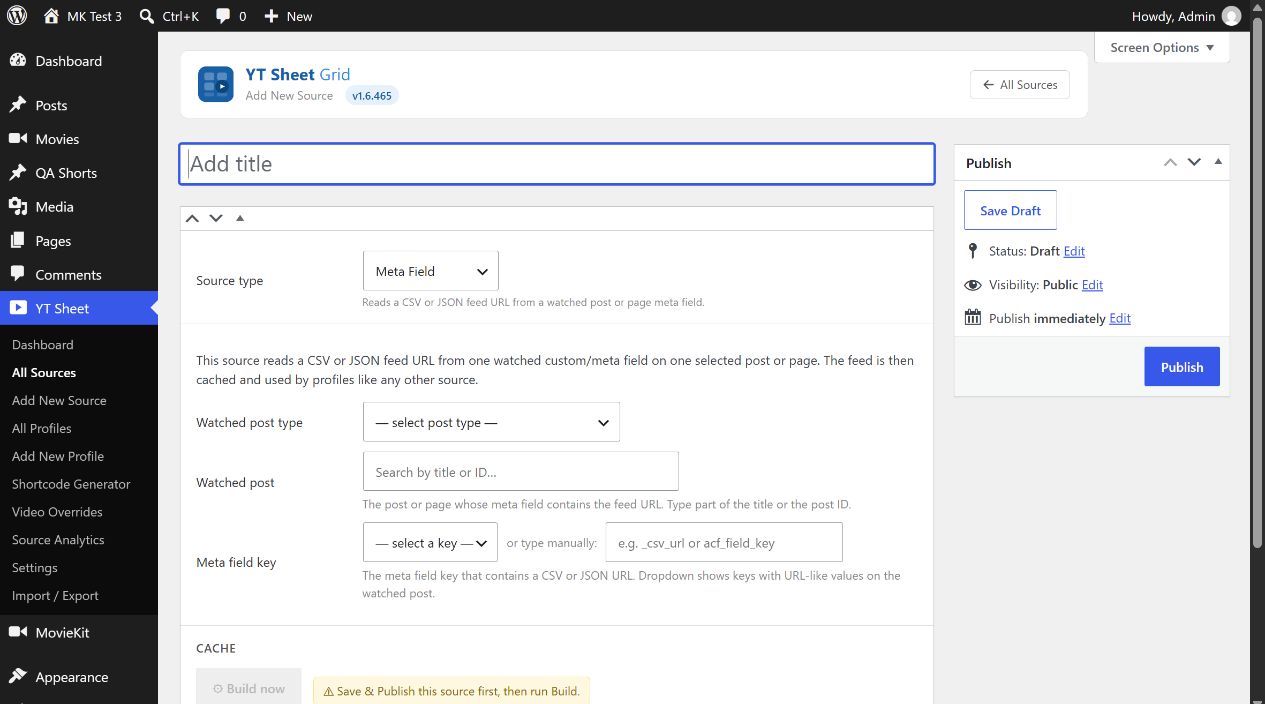
- Select Watched post type. Public types, including Posts, Pages and any public movie types, are listed.
- In Watched post, type part of the title or the post ID, then select the matching published post. Typing text without selecting a result does not set the hidden watched post ID.
- Choose the Meta field key from the watched post’s keys or type it manually. Its value must be a fetchable CSV or JSON URL. The dropdown includes keys with URL-like values.
- Inspect Resolved URL when shown. If the field is empty, update the watched post. A warning appears when the currently resolved URL differs from the URL used for the last build.
- Publish this Source, then select Build now. If you change the watched item or field later, save the Source and rebuild its cache.
This type stores a built dataset like the other Sources; a Profile can select it. A build requires the selected post, meta key and reachable feed. After building, check the Cache area and preview the resulting grid.