MK SYSTEM / DOCUMENTATION
YT Sheet Import and Export
YT Sheet import and export transfers global settings in a JSON file, while sources and profiles need separate migration.
Location: WordPress admin → YT Sheet → Import / Export. This screen transfers global YT Sheet Settings in a JSON file. It does not transfer Sources, Profiles, Video Overrides, cached datasets or Media Library files. Move those separately when migrating a complete site.
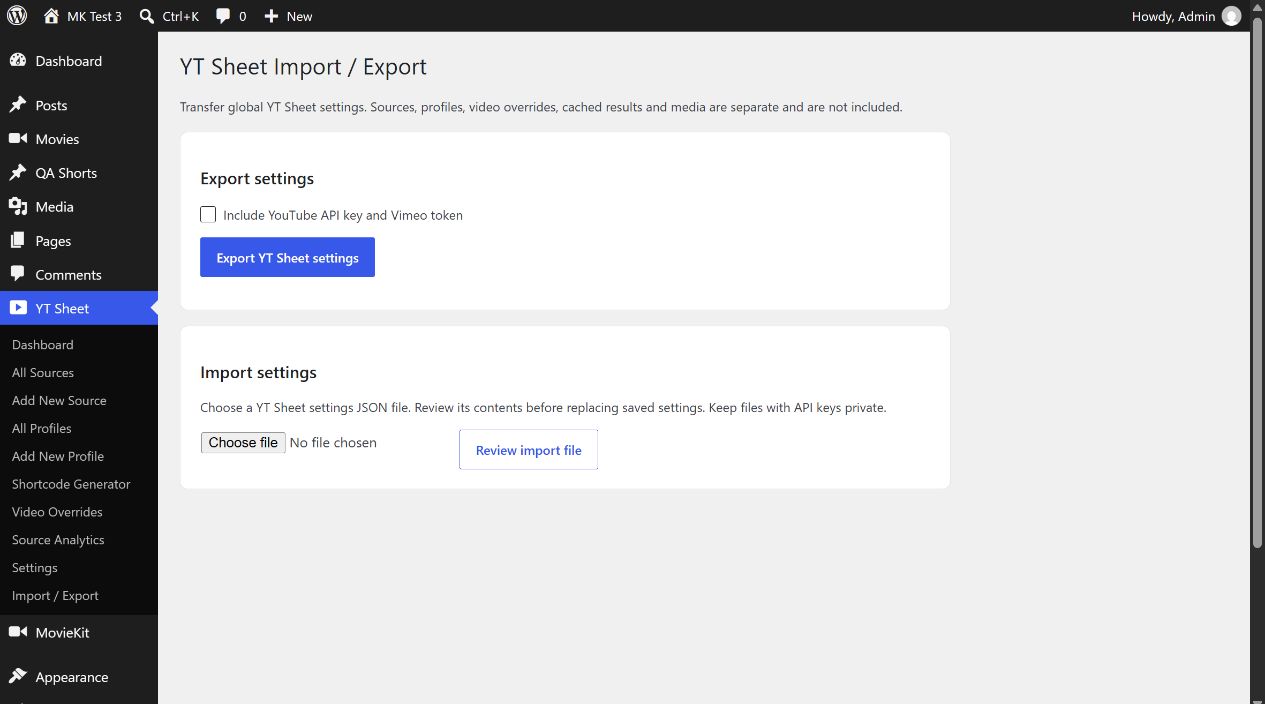
Export settings
- Open YT Sheet → Import / Export.
- Leave Include YouTube API key and Vimeo token unchecked for a settings-only export. Check it only when the receiving site must reuse those credentials and you can store the file privately.
- Choose Export YT Sheet settings. The browser downloads a JSON file containing the format, schema, plugin version, creation time and exported options.
The default export includes source defaults, player, paging, cache, provider, sticky and other global display settings. Credentials are included only if the checkbox is selected. Check the default feed URL after importing to a different site: it may still point to the old location.
Import settings
- Export the target site’s current settings first.
- Choose a YT Sheet settings .json file smaller than 1 MB, then select Review import file. The screen validates its format and shows export version, creation time and setting count.
- Read the credential message: keys in the file replace saved keys; without them, saved keys remain unchanged.
- Choose Import these YT Sheet settings. The plugin stores a backup of the prior settings before applying the imported options. Afterwards, Download settings from before the last import appears on this screen.
- Reopen Settings and inspect the default feed and API controls. Rebuild Sources separately if the site content or feed URL changed.
Import requires an administrator with unfiltered_html permission. The review is temporary and expires after 15 minutes. Importing again replaces the single “before the last import” backup, so download it before a second import if you need to retain it. A JSON package is validated against supported option names and value types; an unrelated WordPress export is rejected.
Video Override rules have a separate CSV import/export. The source list and Profiles are WordPress records, so keep a full WordPress backup for a complete migration.